Claude vs ChatGPT vs Gemini: Which AI Is Actually Better in 2026?
Published on Reading time: 9 min
Contents
There is no single winner. For careful writing, long documents and code, Claude is the strongest of the three. For raw versatility, image generation and the biggest plugin ecosystem, ChatGPT still leads. For anything tied to Google — Search, Gmail, Docs, YouTube — and for handling huge files cheaply, Gemini is hard to beat. Which one you should pay for depends less on benchmarks and more on one question: what do you actually do with it most days?
This comparison skips the leaderboard theatre. Below you get the real differences between Claude (Anthropic), ChatGPT (OpenAI) and Gemini (Google) as they stand in 2026, where each one quietly fails, and a plain recommendation for common jobs like writing, coding, research and study.
Quick verdict: which one wins for which job
If you only read one section, read this one.
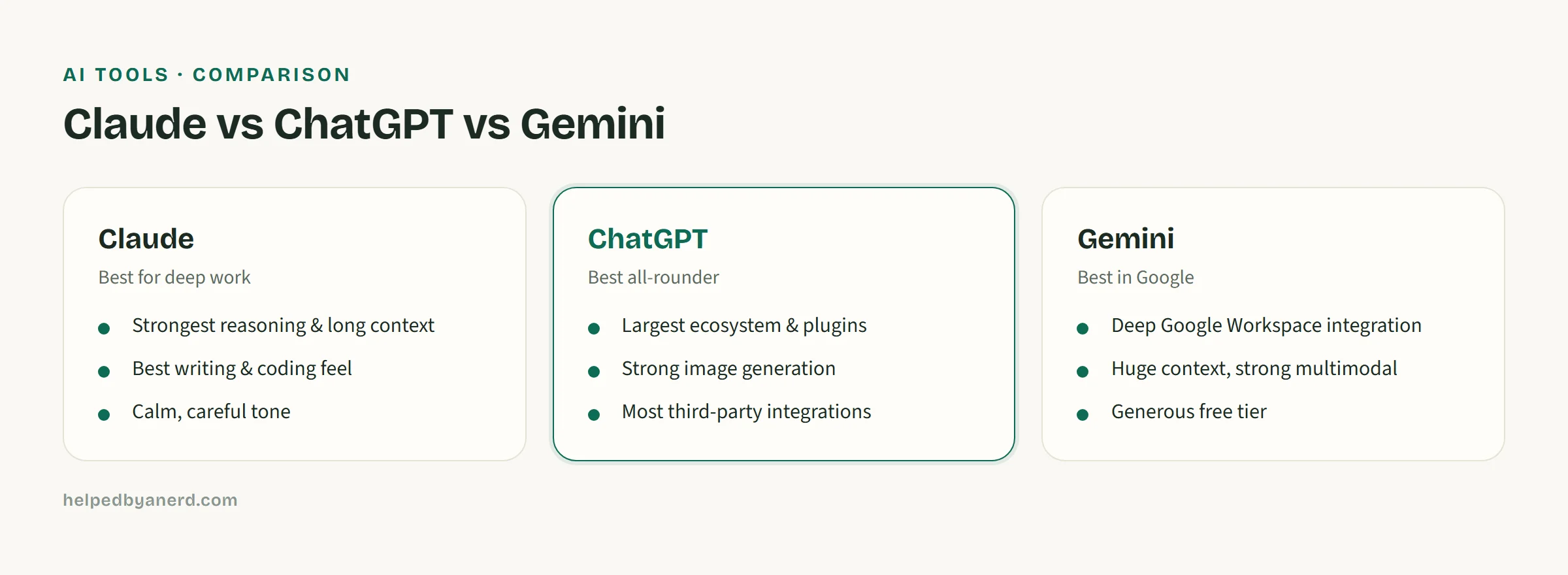
- Writing and editing that has to sound human: Claude. It follows tone instructions closely and pads less.
- Long documents, contracts, whole codebases: Claude or Gemini, because of their large context windows.
- Coding and debugging: Claude Sonnet/Opus 4.x for quality, ChatGPT for the wider tooling around it.
- Everyday questions, brainstorming, image generation: ChatGPT. It is the all-rounder most people reach for.
- Research with live web results and Google integration: Gemini, especially if you live in Gmail and Docs.
- Tightest budget: Gemini’s free tier is the most generous; ChatGPT’s free tier is the most familiar.
The rest of this article explains why each pick lands where it does, so you can override it when your situation differs.
Reasoning and long-context: Claude’s edge
Claude’s strongest area is structured reasoning over long, messy input. Anthropic’s Claude Opus 4.x and Sonnet 4.x models are the ones I reach for when the task is “read these 40 pages and tell me what contradicts what.” Two things drive that.
First, the context window. Claude can hold a very large amount of text at once — long enough to drop in a full contract, a research paper plus its appendix, or several chapters of a thesis and still answer questions that depend on page 3 and page 90 at the same time. It loses the thread less often than the others when the document is long.
Second, instruction-following discipline. When you tell Claude “don’t add a conclusion” or “keep every sentence under 20 words,” it obeys more reliably and argues with you less. For editing work that matters, because the model that quietly ignores half your rules costs you more time than it saves.
The honest limit: Claude has no native image generation, and its free tier is the most restrictive of the three. You will hit usage caps faster than on the others. It is a precision tool, not the one you hand to a curious teenager for an afternoon.
Multimodal and Google integration: Gemini’s edge
Gemini’s advantage is that it lives inside Google. Gemini 2.x is built into Search, Gmail, Docs, Sheets and Android, which means it can act on things you already have rather than things you paste in. Ask it to summarise the thread you are reading in Gmail, or to pull figures out of a Sheet, and it does so without a copy-paste dance.
It is also genuinely multimodal in a practical sense: you can feed it long video, large PDFs and audio, and its very large context window swallows files that would choke a smaller model. For students working from recorded lectures or researchers with stacks of PDFs, that matters more than a benchmark score.
Where Gemini wobbles: tone. Its default writing voice tends toward the generic and slightly inflated, so you spend more time stripping out filler. And the deep Google integration is a double-edged thing — convenient if you trust Google with your data, a reason to hesitate if you do not.
General-purpose chat and ecosystem: where ChatGPT still leads
ChatGPT wins on breadth — it is the safe default for someone who wants one tool for everything. OpenAI’s GPT-5 and GPT-4o models cover text, image generation, voice conversation and a large library of custom GPTs and integrations in one place. If you want to draft an email, generate a logo concept, talk through a problem out loud and analyse a spreadsheet without switching apps, ChatGPT is the least friction.
The ecosystem is the real moat. More third-party tools, browser extensions and tutorials assume ChatGPT than assume the other two combined. When something on the internet says “use AI to do X,” it usually means ChatGPT by default.
The trade-offs are familiar by now. ChatGPT’s writing can drift into a recognisable, slightly salesy voice, and on long documents it forgets earlier details sooner than Claude or Gemini. It is the generalist: rarely the best at any one job, rarely bad at any of them. If you want a wider view of the field, our roundup of AI tools like ChatGPT we tested covers the alternatives in more depth.
Pricing and free tiers compared
All three offer a free tier and a paid plan around the same headline price, so cost alone rarely decides it. The differences are in the limits.
- ChatGPT — Free access to a capable model with daily caps; the paid plan (roughly 20 €/month) unlocks the strongest models, image generation and higher limits.
- Claude — Free tier exists but caps you quickly, especially on the best models. The paid plan (roughly 20 €/month) is where Claude becomes practical for daily work.
- Gemini — The most generous free tier of the three, helped by Google bundling it into existing accounts. The paid plan (roughly 22 €/month) bundles extra Google storage and integration features.
A note on free tiers: “free” usually means a weaker model and a message cap, not the flagship you read about in comparisons. If you are testing which one fits, judge each on its paid model — that is what you will actually rely on.
Privacy and data handling
Treat all three as “do not paste anything you could not email to a stranger” by default — then adjust. The practical differences:
- Claude (Anthropic): Anthropic’s consumer terms lean toward not training on your chats by default, and the company markets itself heavily on safety. Of the three it is the one I would trust first with sensitive text — though you should still read the current settings yourself.
- ChatGPT (OpenAI): You can switch off chat history and training in settings, and business/enterprise tiers add stronger guarantees. The free consumer tier is the one to be most careful with.
- Gemini (Google): The deepest integration also means the deepest data footprint. Convenient, but you are handing content to the company that already holds your email and search history. Worth a deliberate yes, not a default one.
For anything regulated — client data, health information, unpublished research — check the current data-processing terms of the specific plan before you use it, because consumer and business tiers differ a lot.
Side-by-side comparison table
| Feature | Claude (Anthropic) | ChatGPT (OpenAI) | Gemini (Google) |
|---|---|---|---|
| Best at | Reasoning, long docs, writing | All-round, ecosystem | Google integration, multimodal |
| Top models (2026) | Opus 4.x / Sonnet 4.x | GPT-5 / GPT-4o | Gemini 2.x |
| Long-context handling | Excellent | Good | Excellent |
| Image generation | No (native) | Yes | Yes |
| Voice conversation | Limited | Yes, strong | Yes |
| Google apps integration | No | No | Deep (Gmail, Docs, Search) |
| Plugins / ecosystem | Growing | Largest | Tied to Google |
| Free tier | Most restrictive | Familiar, capped | Most generous |
| Paid price (approx.) | ~20 €/month | ~20 €/month | ~22 €/month |
| Writing tone out of the box | Most natural | Slightly salesy | Generic, needs editing |
Prices are 2026 ballpark figures and shift with annual versus monthly billing. The “best at” row is what should actually steer your choice — the rest are tie-breakers.
Which one should you choose?
Match the tool to the job rather than chasing a single best answer.
Choose Claude if you write, edit or code for a living, or you regularly work with long documents — theses, contracts, reports, codebases. You will accept the tighter free tier in exchange for output that needs less cleanup.
Choose ChatGPT if you want one tool that does most things and the largest set of tutorials, extensions and integrations behind it. It is the right default for a small business owner, a student starting out, or anyone who values breadth over a specialist edge.
Choose Gemini if you already live inside Google’s apps, want the strongest free tier, or routinely feed in large files, video and audio. The integration turns it from “another chatbot” into something that acts on the data you already have.
The split most people actually land on: a paid subscription to whichever one fits their main job, plus the free tier of a second for the times the first one is the wrong fit. Many writers pair paid Claude with free ChatGPT for image generation; many researchers pair paid Gemini with free Claude for the careful final edit.
If you are still deciding, the fastest test is to give all three the same real task you do often, on their paid models, and judge the output yourself. For a broader look at the field beyond these three, see the full list of AI tools like ChatGPT we tested.
FAQ
Is Claude better than ChatGPT?
For writing quality, long-document reasoning and instruction-following, yes — Claude usually edges ahead. For everyday versatility, image generation and the size of the surrounding ecosystem, ChatGPT is still ahead. Neither is “better” across the board; it depends on whether you want a specialist or an all-rounder.
Which AI is best for students?
Gemini for working from lectures, large PDFs and anything tied to Google Docs, plus a generous free tier. Claude for writing and editing essays or a thesis where tone and accuracy matter. Many students use Gemini’s free tier for research and Claude for the final write-up.
Which one has the best free version?
Gemini, helped by Google bundling it into existing accounts, gives the most usage for nothing. ChatGPT’s free tier is the most familiar and well-supported. Claude’s free tier is the most restrictive — its strength shows on the paid plan.
Can I use all three at once?
Yes, and many people do. A common setup is one paid subscription for your main work plus the free tier of another for the jobs it does better — for example paid Claude for writing alongside free ChatGPT for image generation. There is no lock-in; the same prompt works in all three.
Which is safest for sensitive data?
Anthropic markets Claude most heavily on safety and leans toward not training on consumer chats by default, so it is a reasonable first choice for sensitive text. Whichever you pick, switch off chat history or training where the setting exists, and read the current data-processing terms for regulated information rather than trusting a default.
